Features // The reading layer

It does not just draw the auction. It reads it.

Profile charting shows you where the market did business. CutlassEdge reads the session as it builds: the opening type, the day type, the levels the auction has unfinished business with, and what has historically followed, with the sample size on every number. Then it helps you plan the day, review it, and practice. You keep every decision.

Mac and Windows Local first Two computers per license Bring your own data feed
The reading layer

Five reads, kept current for you.

Every read is descriptive and traceable: the same for every user looking at the same market, an informed opinion, never a signal. The panels below are the app's own Crow's Nest.

Classification

Day and opening types, as the session builds.

From the first prints CutlassEdge names the opening type, then tracks the day type the session is shaping into: the read a seasoned auction trader keeps in their head, kept current for you and written in plain words.

  • Opening type locked from the first hour Open-Drive, Open-Test-Drive, Open-Rejection-Reverse, Open-Auction, plus chop zones, gap clocks, and overnight inventory
  • Day type from the finished shape balance, range extension, neutral, P and b shapes, double distribution, inside day
  • Plain labels no black box, no score you cannot trace
CUTLASSEDGE · SESSION CLASSIFICATION · ILLUSTRATIVE REPLAY
09:30 · READING THE OPEN A PERIOD
Levels

The magnet levels price keeps returning to.

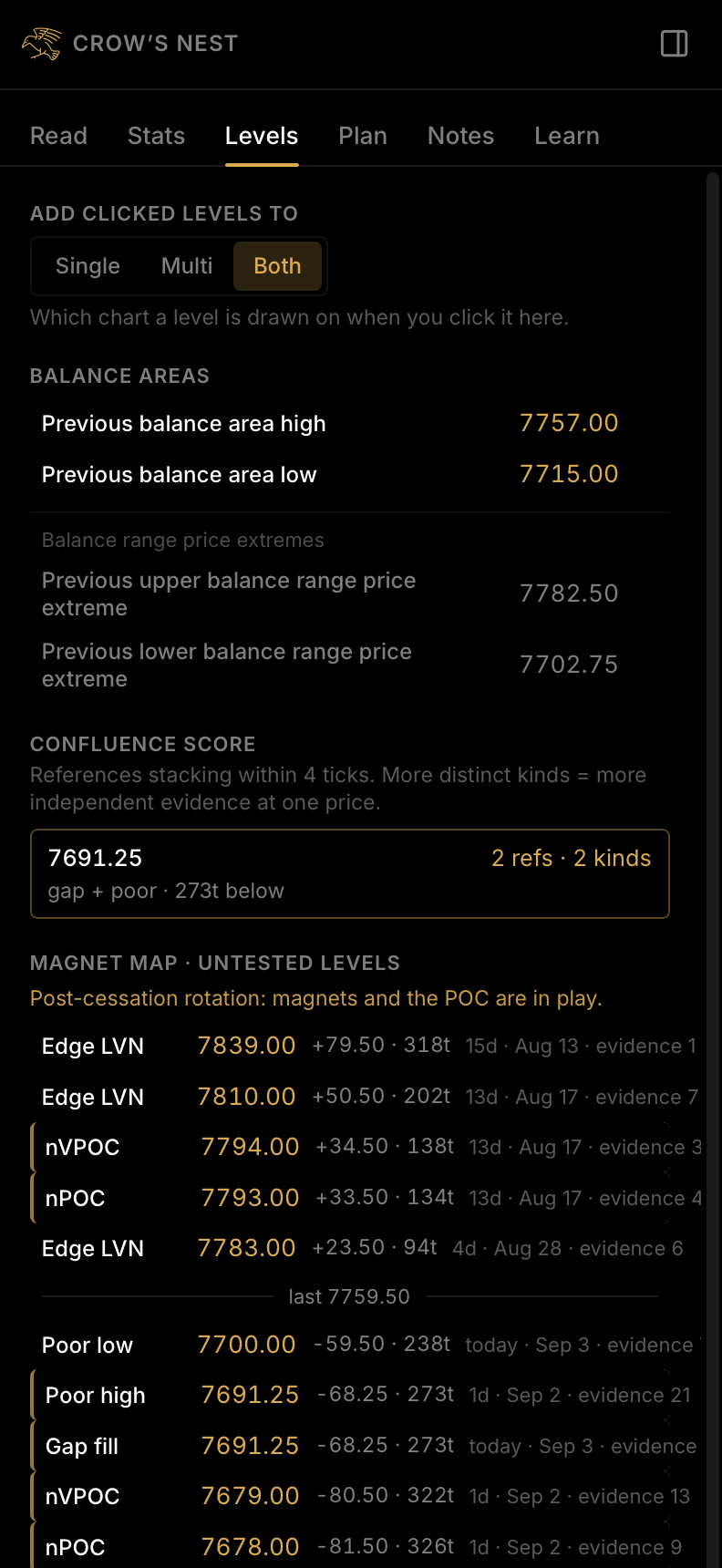
Naked VPOCs, poor highs and lows, gaps, low volume nodes, weak references, single prints. CutlassEdge marks the levels the auction has unfinished business with, each with its distance, its age, and its evidence, so you are watching the same lines the market is.

  • Untested levels surfaced automatically with the day they formed and the evidence behind each
  • Balance areas and the prior week's value the ranges the market keeps returning to
  • Confluence score where several kinds of level stack within four ticks
  • Click a level to drop it on your chart and keep your own alongside
CROW'S NEST · LEVELS
The Crow's Nest Levels tab: balance areas, a confluence score, the magnet map of untested levels with distance, age, and evidence, and the key levels
LIVE SCREENSHOTES, one session of history loaded
Base rates

What has historically followed, with the count.

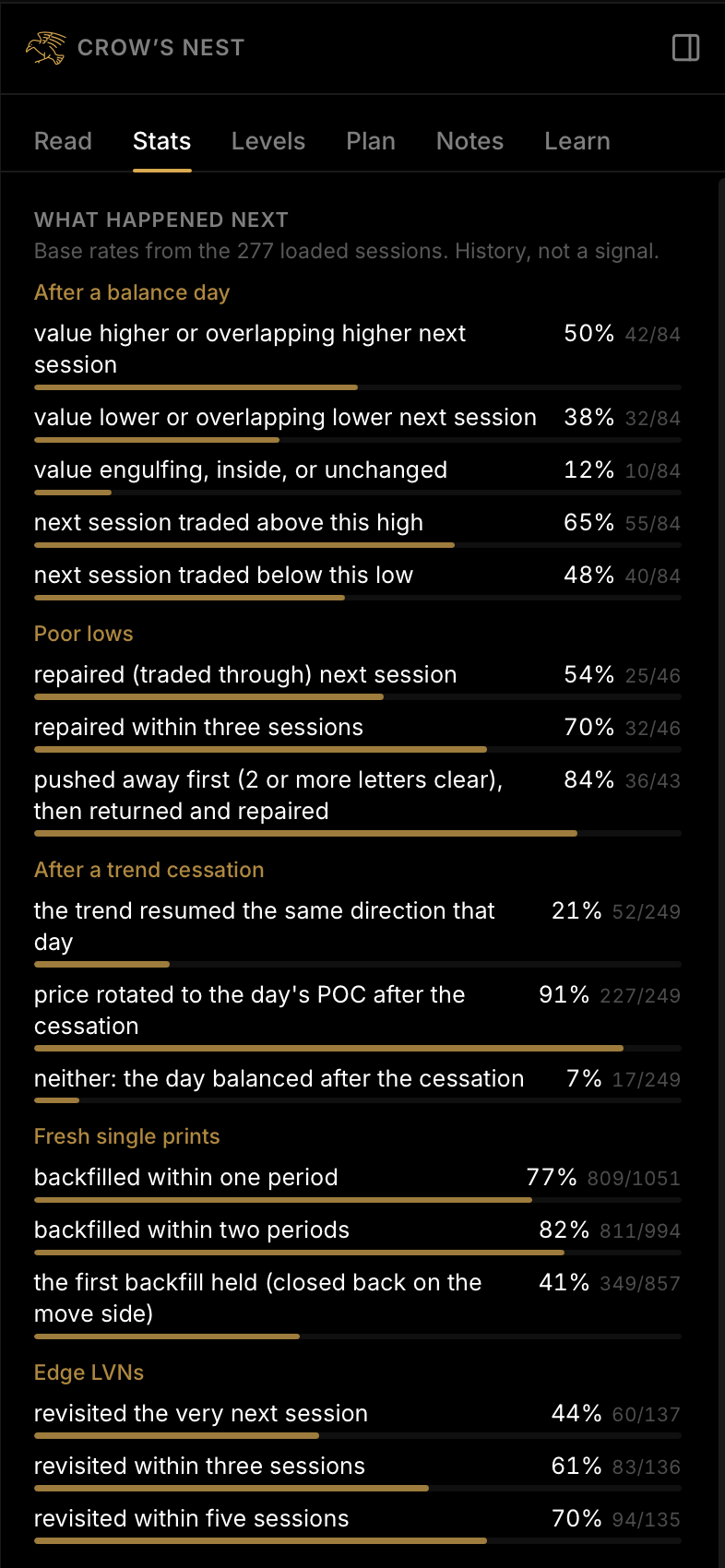
For the situation on the screen, CutlassEdge shows what happened next across past occurrences, and how many times it has been seen. Never a prediction and never advice. A description of the past, with the sample size in plain view because small samples mislead.

  • Base rates tied to the condition you are looking at balance days, poor lows, trend cessation, fresh single prints, edge LVNs, weak references
  • Sample size on every number and a warning when the sample is thin
  • Computed from the history you load on your machine, so the odds are for your market
CROW'S NEST · STATS
The Crow's Nest Stats tab: what happened next after balance days, poor lows, trend cessation, fresh single prints, edge LVNs, and weak references, each with its sample size
LIVE SCREENSHOTHistorical. Describes the past. Not a prediction or advice.
DisclosureStatistics shown are computed from historical market data and describe the past. Hypothetical or historical results have inherent limitations. They do not represent actual trading, are prepared with the benefit of hindsight, and do not reflect real conditions such as slippage, fees, and liquidity. No representation is made that any account will or is likely to achieve similar results. Sample sizes are shown because small samples mislead.
The read

The whole read, in plain language.

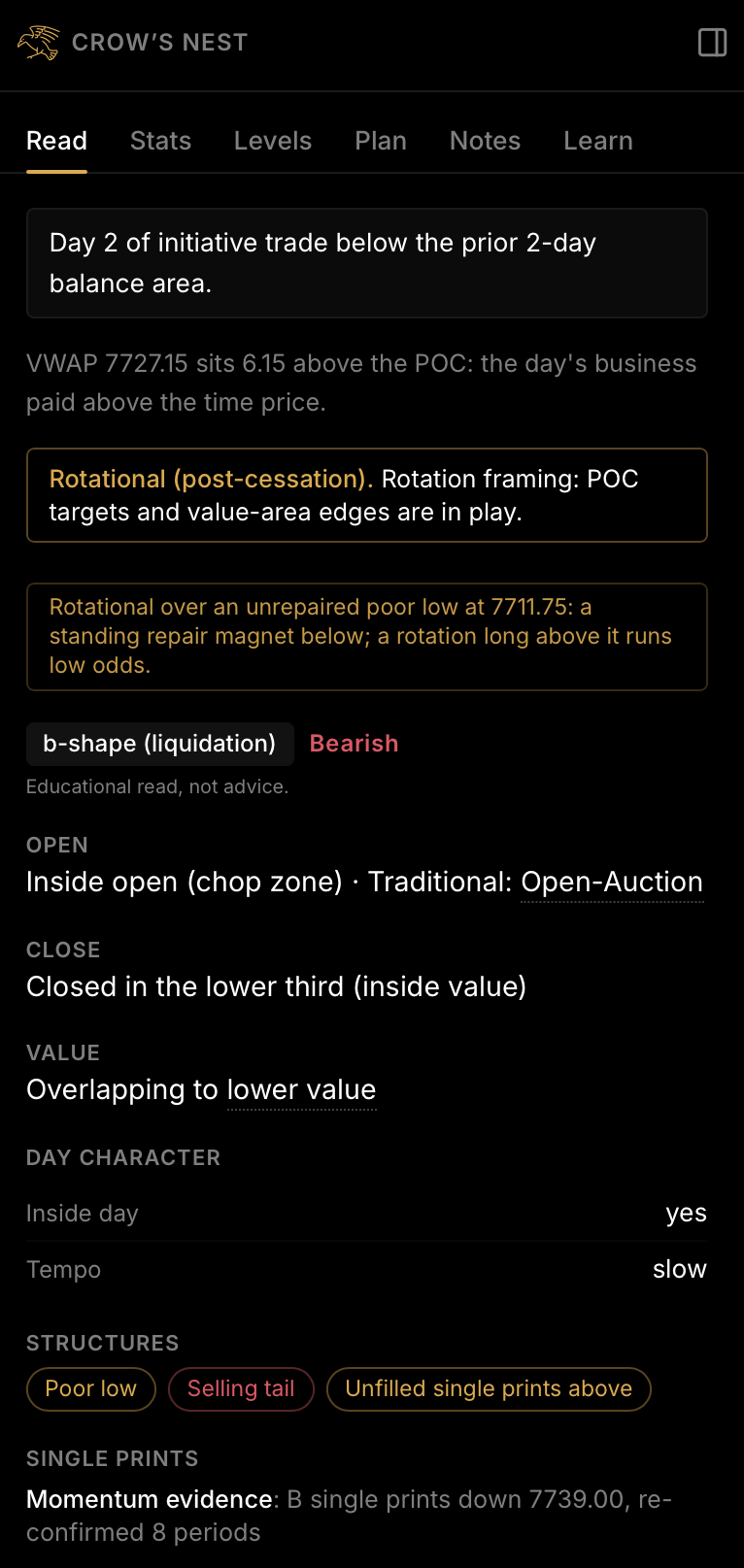
The Read tab leads with the day's state, says whether the structure leans bullish, bearish, or neutral, lays the day out in fields, flags the structures, and ends with a short game plan of if/then lines keyed to that state. One click copies it as clean text for your notes or a daily post.

  • Day state first inside the first hour, trending, or rotational
  • Open, close, value migration, day character, structures tails, poor highs and lows, single prints, naked POCs
  • If/Then reads Plainly laid out possible scenarios for the market based on the data, to help you plan your next trade
CROW'S NEST · READ
The Crow's Nest Read tab: the day's state, a b-shape day read as Bearish with the line Educational read, not advice, then the open, close, value migration, day character, and structure chips
LIVE SCREENSHOTEducational read, not advice
Context

Analog days

CutlassEdge compares today's profile shape against every session in your loaded history and shows the five closest, each with its match percentage and what the following session did. Above the list, the aggregate: how many of those days closed higher, lower, or flat next. History, not a signal.

At a glance

Confluence score

Where several different kinds of level land within four ticks of one another, that is a cluster, and the score counts the distinct kinds. More kinds means more independent evidence at one price. A glance, not a green light. You still decide.

A trading day with CutlassEdge

Before the open, through the close, and after.

The reading layer is the core. Around it sit the tools a session actually needs, in the order you need them.

Before the open

Get oriented.

One page, fresh each morning

Morning Brief

Yesterday's auction, the overnight so far, the balance area, the nearest untested magnets, what history says about a day like yesterday with its samples, and a few if/then lines. Copy it to your clipboard or save it as a one-page PDF.

Read the guide
Your plan, watched

Battle Plan

Write scenarios from the app's own conditions: a direction, a trigger, an invalidation, targets. Arm one and CutlassEdge watches it all session and tells you where it stands. When it resolves, outcome tracking asks whether you took it, skipped it, or faded it, and remembers.

Read the guide
During the session

Stay on the read.

Location, not a signal

The Compass

Two cells in the header, one for the long side and one for the short, each reading Edge, Neutral, or Extended. It rates how close a side would be entering to value and structure. It never says whether to take the trade.

Read the guide
Once per level

Alerts

Price alerts, plus alerts on the app's own levels: naked VPOCs, poor highs and lows, single prints, gap fills, confluence clusters, balance-area edges. A toast, a sound, and a desktop notification the first time price trades one.

Read the guide
A journal in the chart

Notes

Kept per symbol and per trading day. Pin a note at a price, snapshot the chart with it, and let your alerts log themselves into the same timeline. Save the day as a PDF. It all lives on your computer.

Read the guide
After the close

Review, then practice.

Honest reps

Session Debrief

The app stops at the day's important moments, rewinds the chart to what was knowable then, and asks you to make the call. Reveal shows what actually happened, alongside the base rates for that kind of moment, and scores your read.

Read the guide
Nothing peeks ahead

Replay

Rewind any day you have data for and play it forward, down to one-eighth speed. The letters, the volume, the value area, the magnets, and the reads all update as of that moment, exactly as they would have live.

Read the guide
The foundation

Proper profile charting, done right and included.

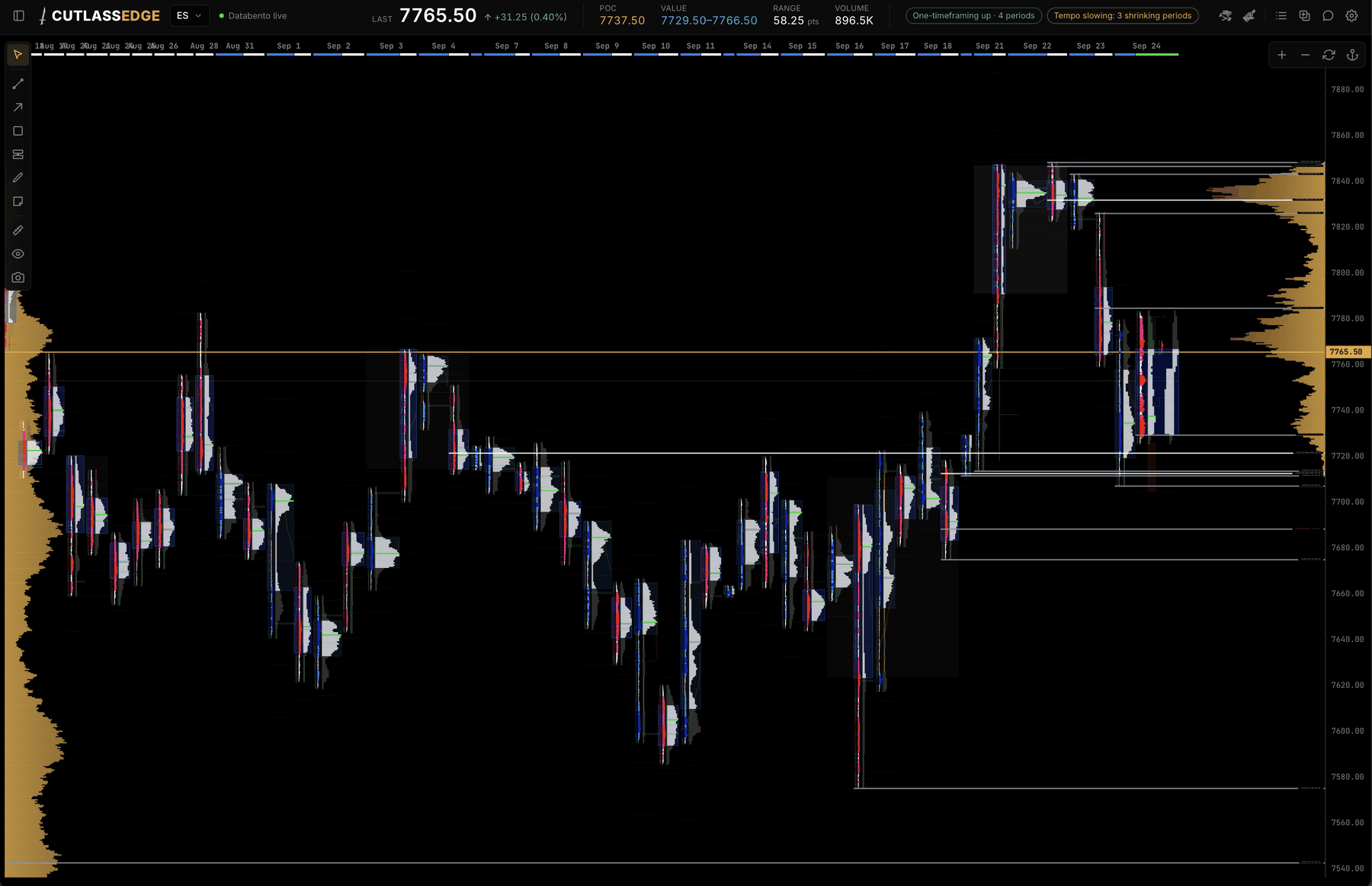
The reading layer stands on the charting. Split and merged profiles, time and volume side by side, the overnight, and the indicators that belong on an auction chart.

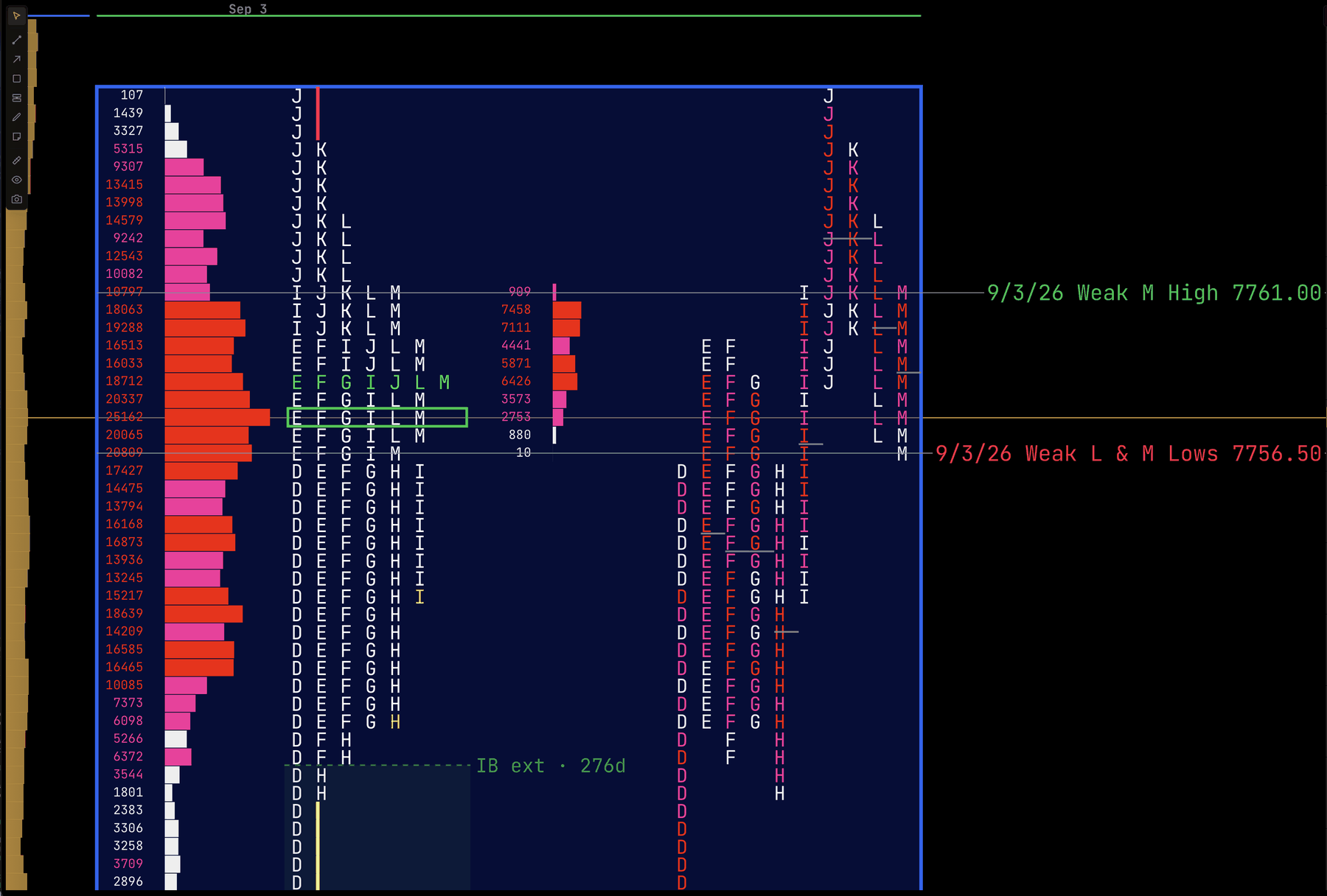
CUTLASSEDGE · ES · MULTI-SESSION VIEW WITH THE CROW'S NEST
The CutlassEdge desktop app: a multi-session TPO and volume profile chart with untested levels marked, and the Crow's Nest Read tab open on the right
LIVE SCREENSHOTEight sessions of ES, the naked levels drawn across, the read on the right
Charting

TPO and volume profile

Time and volume, side by side. The Time POC and the Volume POC, a value area at 70 percent by time or by volume, letters or blocks, high and low volume nodes, and the TPOC trail. Showing both POCs at once is the fastest way to spot a divergence.

Charting

Sessions and splits

The regular session by default, keyed to exchange time whatever your own clock says. Draw the overnight alongside, split a day into morning and afternoon, build custom profile sets in the multi view, or merge days into a composite.

Charting

Indicators

VWAP drawn one step per period, with standard-deviation bands. Initial-balance extension zones drawn from your loaded history. A cumulative volume delta strip on tick data. The balance map, which finds the multi-day balance and watches its edges.

Yours, on your machine

Bring your own data

Connect a supported live feed for the live read, import CSV history, or start with the built-in sample data offline. Local first: your data, your charts, your notes, and your plans never touch our servers. Supported feeds.

Native and quick

Mac and Windows

A fast native desktop app that updates itself. macOS 11 or later on Apple Silicon or Intel, Windows 10 and 11. Under 100 MB installed. One license runs on two computers, and after a one-time activation the app works offline.

Made to be read

Reading options built in

Atkinson Hyperlegible and OpenDyslexic among the typefaces, panel text up to 150 percent, roomy letter spacing, and Dark, Calm, and color-blind-safe themes. Built by a dyslexic trader, so readability is a feature, not an afterthought.

Draws it vs reads it

What changes when the software reads.

Most platforms will draw you a profile. The difference is everything that happens after the drawing.

What you getTypical profile chartingCutlassEdge
TPO and volume profiles, value area, initial balanceYesYes, time and volume side by side
Names the opening type and the day typeYou do it in your headAs the session builds
Marks untested levels with their age and evidenceYou draw and maintain themAutomatic, with a confluence score
Base rates with the sample size on every numberNot usuallyFrom your own loaded history
The five most similar past sessionsNot usuallyRanked by match, with what followed
A written plan the app watches and reports onNot usuallyBattle Plan, with outcome tracking
A debrief that quizzes you on a finished dayNot usuallySession Debrief, scored
Dyslexia-friendly type, spacing, and contrastRareBuilt in
Your data stays on your machineVariesAlways

"Typical profile charting" means the profile tools on a general charting platform. Some platforms offer some of these as add-ons or plug-ins; check yours.

One plan

Everything on this page, one subscription.

One subscription: the reading layer, the charting, and the daily tools, on both your computers.

$59 PER MONTH or $590 PER YEAR

Subscriptions renew automatically at $59 a month or $590 a year until you cancel, plus applicable tax. Founder pricing is open through December 6, 2026. Cancel any time from the customer portal.

Questions

Before you decide.

Do I need to already know auction theory?

No. Every read is written in plain words, and tapping a structure chip shows its definition. The Learn library covers the concepts from the first profile up, and Replay and the Session Debrief let you practice on past days before you ever read one live.

Is this trading advice, or a signal service?

Neither. CutlassEdge describes the auction: what the structure looks like, which levels are untested, and what has historically followed, with the sample size shown. It is the same impersonal, educational read for every user looking at the same market. It never tells you to buy or sell, and the standing line under the read says so.

What data do I need?

For the live read, a supported live feed. For study, import CSV history with no account at all, or start with the built-in sample data offline. The Download page lists the supported feeds and what each one enables.

Can I run it on two computers?

Yes. One license activates on two computers, a desktop and a laptop, say. Switching machines is self-serve: deactivate on the old one, activate on the new one. Your workspaces, notes, and plans live on each computer, and Backup lets you carry them over.

Does my data leave my machine?

No. Your charts, your history, your notes, and your plans stay on your computer. Activation is the one online step, and the app runs offline after it.

Can I cancel?

Yes, any time, from the customer portal, with no hoops to jump through. Refunds follow the Refund Policy.
Seize the edge

See it read a live session.

Subscribe, connect your feed, and CutlassEdge reads the auction from your first session.